Version 3.19
In version 3.19, we have focused on expanding the employee panel, increasing the flexibility of dashboards and operational widgets, and improving working time monitoring and reporting. Below you will find the key changes—starting with the new features, followed by the enhancements.
 New: My Time Harmony (web application) — employee schedules
We are continuing to expand the My Time Harmony (MTH) module, aiming to create a comprehensive employee self-service panel. Previously, employees could record their activities, and in the last release, we added the option to send and receive messages. In this version, we are introducing a preview of personal schedules—previously available only in the mobile app, and now also accessible in the web (browser) version.
Employees gain access to the "Schedules" screen directly in their browser, where they can view their published shifts without needing to ask their supervisor.
WHAT THE EMPLOYEE GAINS
- Two schedule views: Calendar (monthly grid) and List (month grouped by weeks).
- Day details on selection: Shift hours, day type, absences, and holiday information—displayed in a side panel with seamless navigation between days.
- Clear markings: Distinct highlighting for the current day, public holidays, Sundays, and days off.
- Schedule download: Exporting personal schedules to an .xlsx file for a selected date range.
HOW IT WORKS
- Employees can only see their own published schedules—draft versions remain invisible.
- The screen is purely informational (read-only).
- The "Schedules" option is visible only if the module is active for the specific instance.
- In future releases, we will expand the module with additional features, including employee files and requests (with a preview of available limits).
1. Fewer queries to supervisors: Self-service access to schedules streamlines work organization.
2. Employee certainty: Clear information on when and at what hours to report for work.
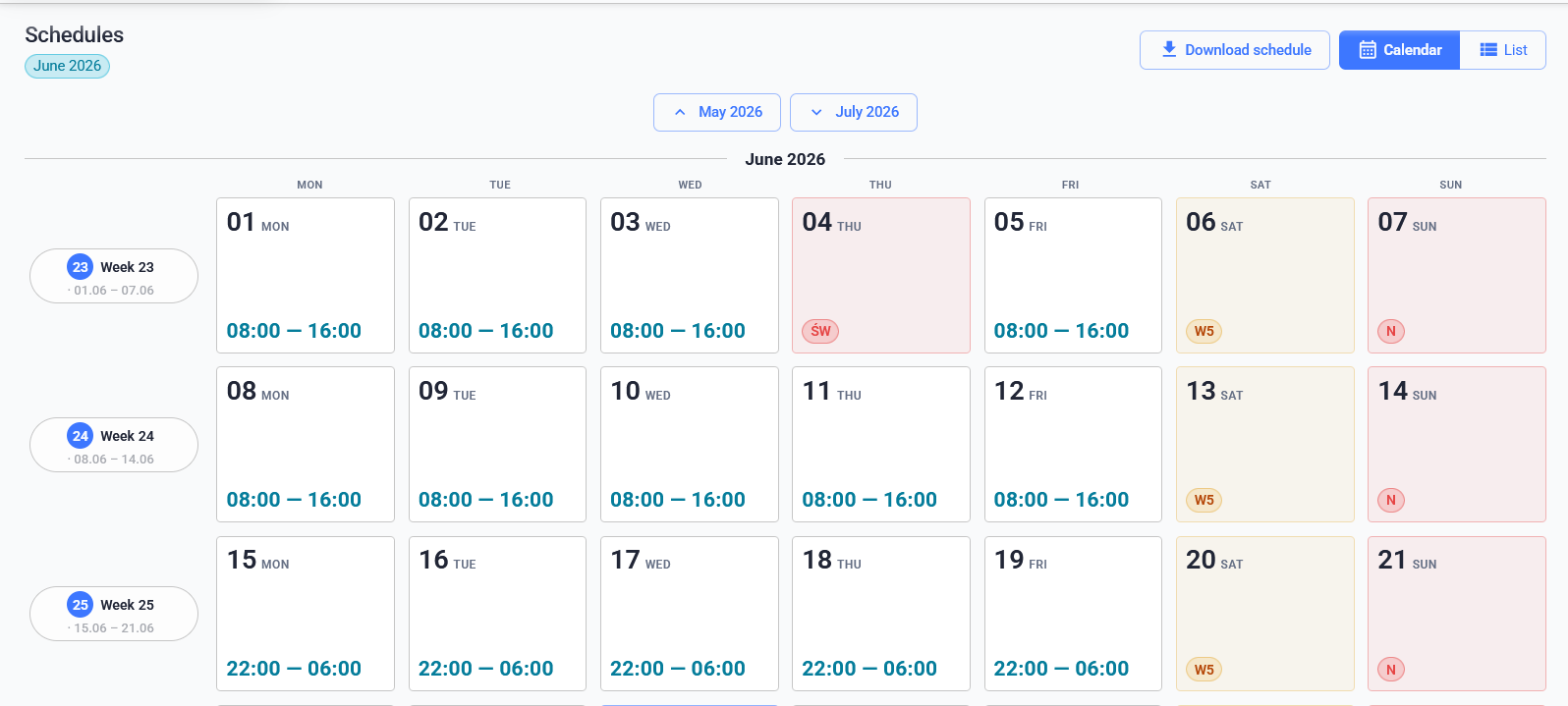
Configuration: Functionality enabled by default
To change: Settings → Settings → My Time Harmony (Web application) → Update → Schedule
New: Alert - Prolonging of open work
Currently, the system provides alerts for an excessively long duration of a single activity. However, there was no control over an employee's total open work time—calculated from the start of work, regardless of the number and type of activities performed in the meantime.
We are introducing an alert that monitors the total duration of open work and notifies when a configured threshold (e.g., 8 hours) is exceeded. Time is calculated from the "Start Work" activity, and the work remains open until it is officially closed.
WHAT YOU GAIN
- Configurable threshold: A limit value tailored to the organization's working time policy.
- Familiar notification channels: Alerts are sent through the existing alert system channels.
1. Reduced risk of exceeding maximum allowable working hours.
2. Fast response from supervisors to excessively long open work sessions.
3. Less manual monitoring and cleaner reporting data.
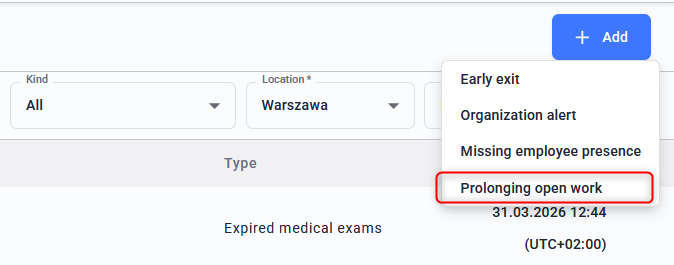
Configuration:
Access path: Workspace → Planning → Alerts → Add → Prolonging open work
New: Selected T&A widgets available in the Activity Registration module
The widget dashboard presents operational data, such as the number of employees present or on break. Previously, each widget was assigned to a single functional module, meaning some useful widgets were exclusively available within their native module.
Starting with this version, we are making selected Time & Attendance (T&A) widgets available in the Activity Logging module as well—without requiring the full T&A module.
A client using only the Activity Logging module previously could not place typical T&A widgets on their management dashboard—such as the number of employees present or on break. From this version onward, these widgets are available to them.
WIDGETS AVAILABLE IN BOTH MODULES
• Employee break counter
• Present employees
• Current presence per department
• Current presence per tag
• Current presence per work section
• Current presence per workstation
• Employee counter per employer
1. More comprehensive management dashboard: Key T&A widgets are now also available to clients using the Activity Logging module.
2. Greater flexibility: A richer set of views without the need to purchase an additional module.
3. Centralized management: One widget definition, multiple applications.
New: Simplified working time report
The standard "Employee Working Time" report contains a full set of information that can sometimes be too detailed for specific audits—such as inspections by the National Labour Inspectorate (PIP). We are introducing a simplified record: a report limited to basic, clear data.
THE SIMPLIFIED REPORT INCLUDES
• Employee name and ID number,
• Day of the week and date,
• Work start and end time,
• Recorded working time along with a summary.
The set of filters for generating this report is identical to the standard "Employee Working Time" report.
1. A clear, basic summary ready to be presented during external audits or inspections.
2. Eliminating data clutter allows for quick document preparation.
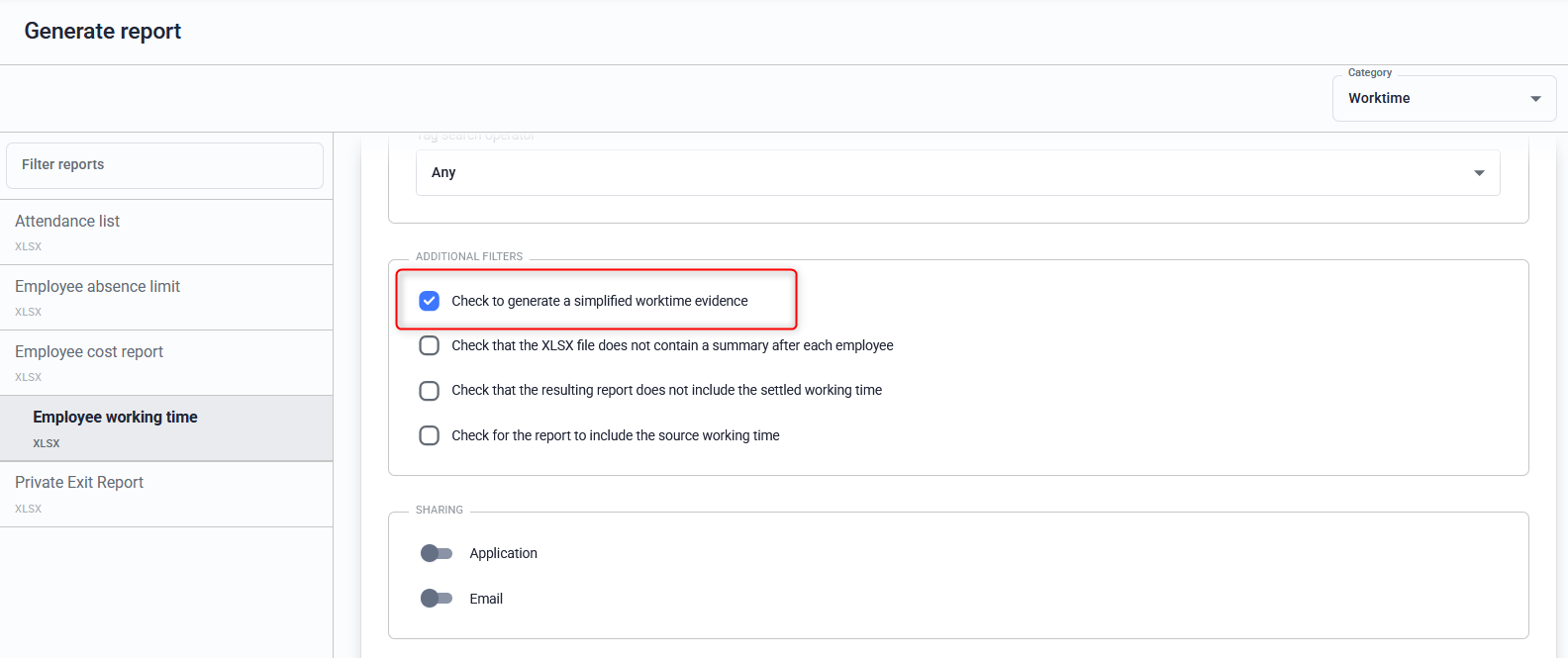
Configuration:
Access path:
Reports → Generate report → Time and attendance → Report - "Employee working time " → Select to generate a simplified time and attendance record
New: New widget — activity with assigned dictionary element
We are introducing a widget that shows supervisors the context in which employees are working. The context is a selected dictionary element—such as a client, product group, or other information relevant to the organization.
FOR EACH ACTIVITY IN PROGRESS, THE WIDGET DISPLAYS
• Employee (first and last name),
• Activity name,
• Assigned dictionary element.
The dictionary parameter is selected when adding the widget to the dashboard.
1. A single glance allows you to see who is working, on what, and in what context (e.g., for which client).
2. Better managerial insight into the team's ongoing work.
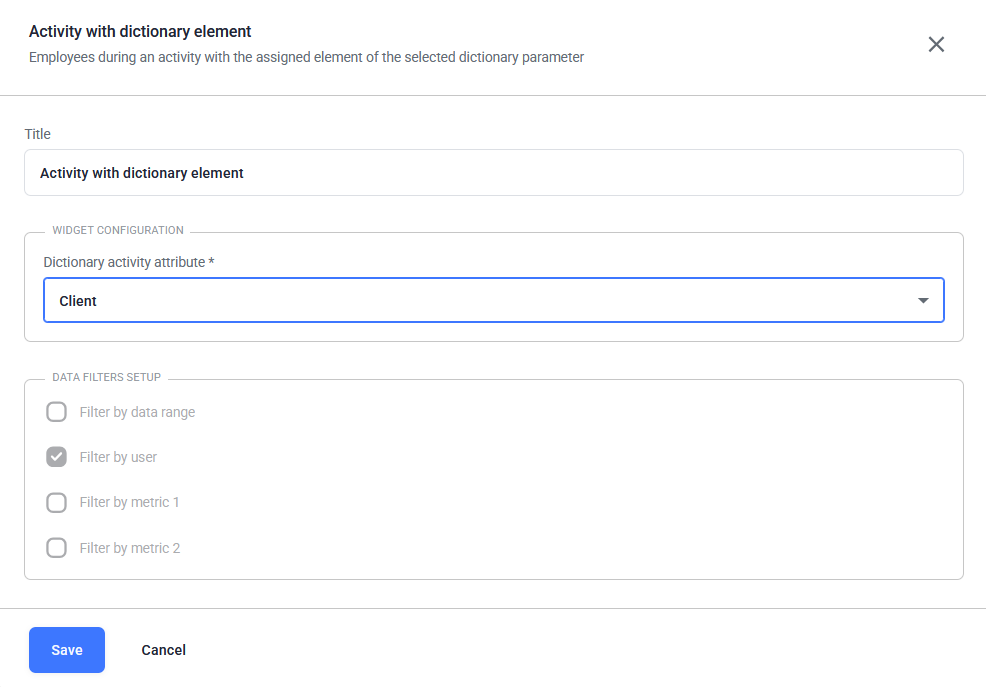
Configuration:
Access path:
Workspace → Start → Edit → Add widget → Table visualization →"Action with dictionary item" widget
New: Development of the "Employees in Activities" widget
The "Employees in Activities" widget shows the percentage share of employees across individual activities, and hovering over a chart element displays the number of employees in that activity. We are expanding it to include a tabular view with employee names.
WHAT'S NEW
• View toggling: Seamless transition between the pie chart and the table without reloading the page.
• Employee list on click: Clicking a specific chart slice (showing the percentage share and number of employees) displays a list of employees assigned only to that activity.
• Tabular view: All employees grouped by activity, featuring the activity name and the employee's display name.
• Handling large datasets: Scrolling or pagination, along with the total number of active employees.
• Data consistency: Values in the table strictly match the data on the chart.
1. The ability to verify not just the count, but the specific employees assigned to a given activity.
 Enhancement: Mass adding of events
Previously, mass adding of events applied to all employees within the filter range (e.g., location, department)—including those who were not at work on that day. This option remains available, but we are supplementing it with more precise variants.
NEW CAPABILITIES
• Only employees currently at work: The event is applied exclusively to individuals with an active workday and open work. Absent employees (vacation, sick leave, no started work) are skipped.
• Selected employees: The option to select specific individuals manually by typing a few characters—allowing precise redirection of chosen employees to another task.
If no employee meets the criteria, the system will display an appropriate message.
1. Precise targeting of events where they are needed, without affecting absent staff.
2. More efficient, real-time team management.
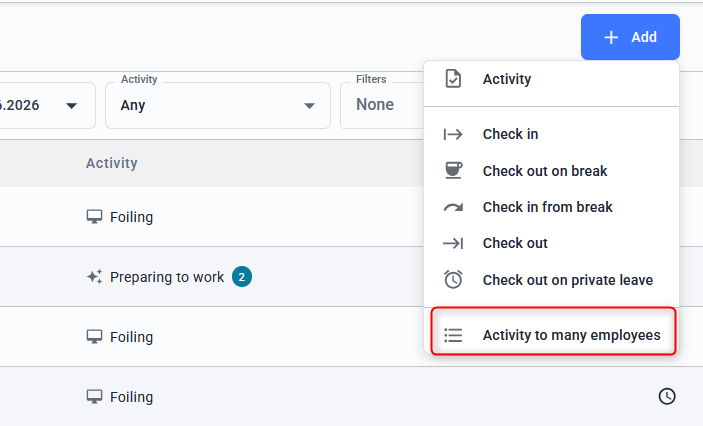
Configuration
Access path:
Workspace → Record → Work Time → Events → Add →Activity to many employees
Enhancement: Thousands separator on widgets
At the request of clients reporting very large values (e.g., number of kilograms), we are introducing a thousands separator to improve the readability of the presented data.
WHAT CHANGES
• New "thousands separator" parameter: An additional setting in the user profile, set to a space by default.
• Available choices: No separator (22345), space (22 345), or apostrophe (22'345).
1. Large numerical values on widgets become scannable at a glance.
2. Each user can customize the data presentation method to their own preferences.
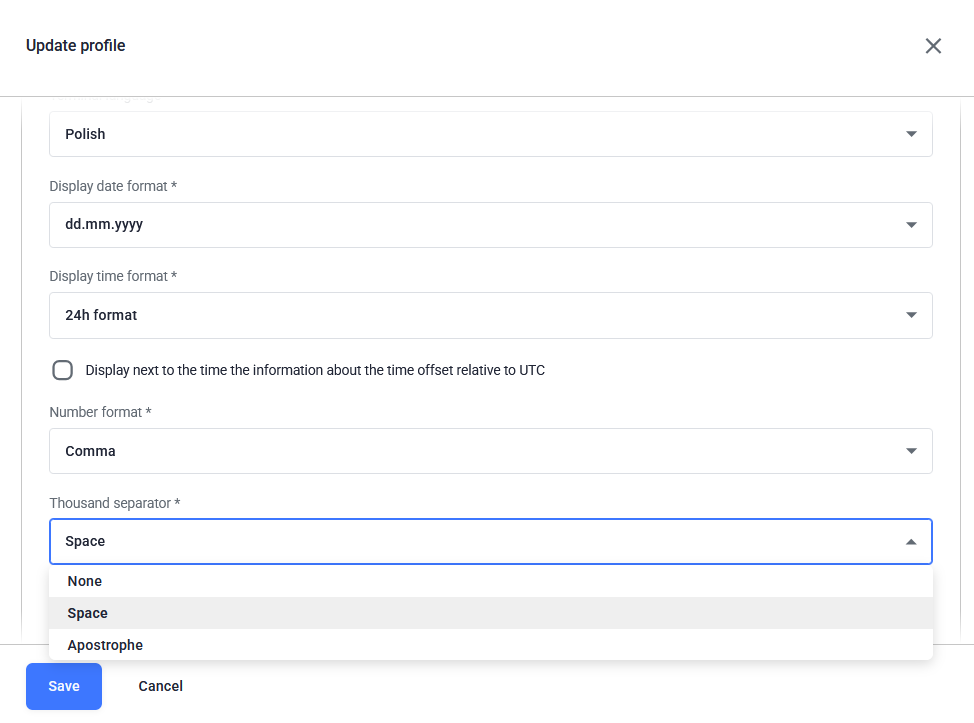
Configuration:
Organization → Users → Select an Employee → Profile → Update → Thousand separator
Enhancement: Supervisor data completion for selected activities
Employees register activities on terminals, but some parameters should not be filled in by the employees themselves—such as data requiring a supervisor's decision/verification or values difficult to determine at the time of logging (e.g., order number or number of pallets). We are introducing a mechanism that delegates the completion of such data to the supervisor.
WHAT THIS CHANGE ENABLES
• Attribute marking: In the activity tree, we specify which attributes are to be completed by the supervisor.
• Hidden on the terminal: The specified attributes are not visible to the employee during registration.
• "Action required" list: Events requiring completion are flagged and can be filtered out on the working time events screen.
1. Sensitive data or entries requiring management decisions enter the system from the correct source.
2. Supervisors can quickly see which activities require their input—across all subordinates simultaneously.
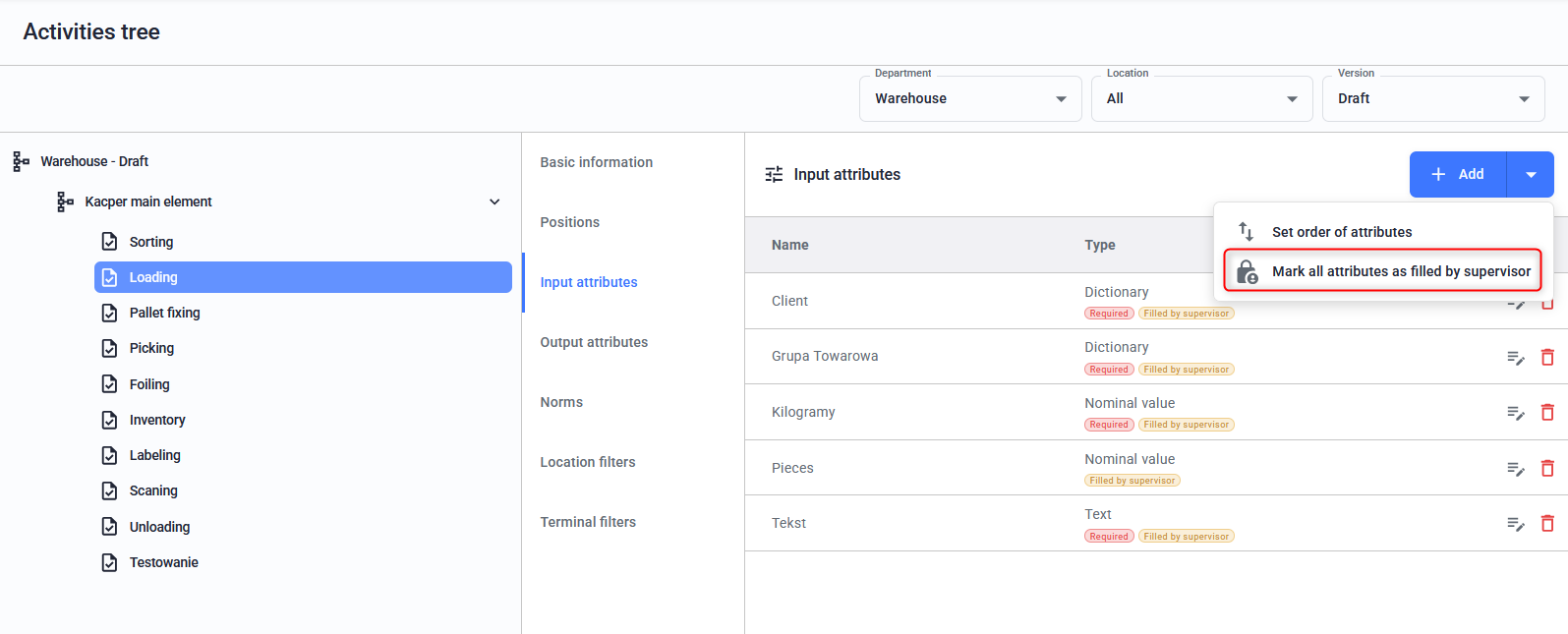
Step 1_Configuration on the activity structure:
Access path:
Workspace → Activity structures → Select activity from the structure → Input/Output attributes → Add: Mark all attributes as filled by supervisor
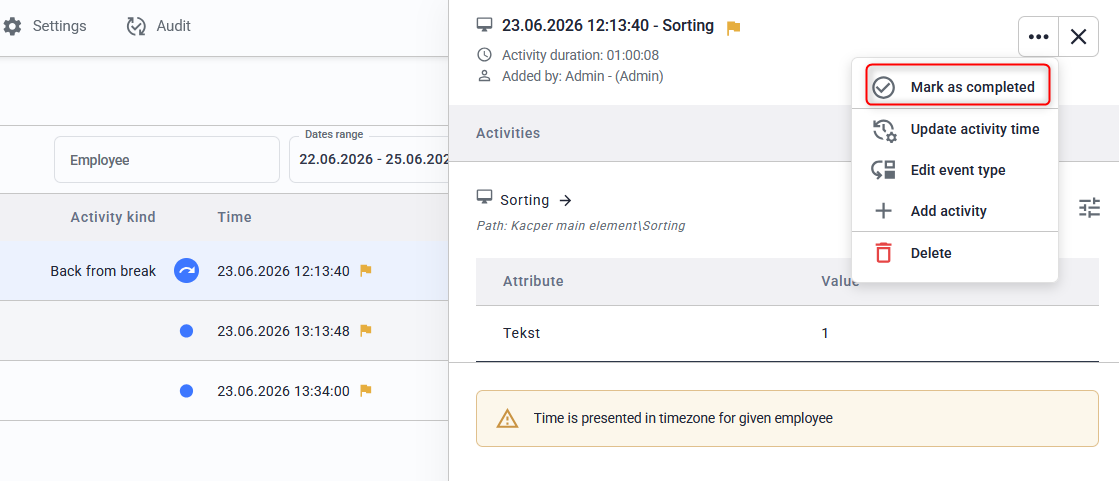
Step_2 Event handling by a supervisor:
Access path:
Workspace → Record → Worktime → Events → Filters → Requires reaction → Select activity → Fill requested attributes → When finished: Click Mark as completed

©
2023 P2P2 Sp. z o.o. I Wszystkie prawa zastrzeżone